MECCHA CHAMELEON has three main game modes — Basic, Infection, and Double — plus a full set of lobby settings that shape every round. This guide explains how each mode works and how to configure server settings, filters, Forced Taunt, Ammo Limit, and other options for your group.
Whether you are setting up a casual night with friends, a competitive match, or a beginner-friendly teaching session, the right configuration matters.
1. How to Create and Join a Server
Before you can play with friends, someone needs to host a server. MECCHA CHAMELEON supports both public and private servers, so you can join random matches or keep a lobby invite-only.
Creating a Private Server
After launching the game, select Create Server from the main menu. You will see a setup screen with these options:
- In-game name: Your display name for this server. It defaults to your Steam name unless you change it.
- Server name: The name your friends will see when searching for the lobby.
- Server password: A password required to join. Use this for private sessions.
- Max players: The maximum number of players allowed. The hard cap is 24, but the developers note that lobbies above 14 players may experience instability.
- Region tag: Helps nearby players find public servers with lower latency.
- Server tag: Labels like "Beginners Welcome" to describe the lobby style.
After setting everything, click Create Server to launch the lobby.
Joining a Server
To join a private server:
- Click Find Server.
- Select Find Private Server.
- Enter your display name at the top.
- Enter the server name and password.
- Click Search Server.
- If the details are correct, the server will appear on the right with a green Join button.
Changing Server Settings in the Lobby
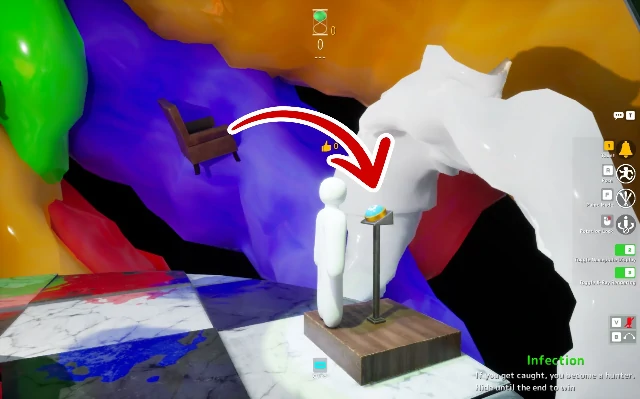
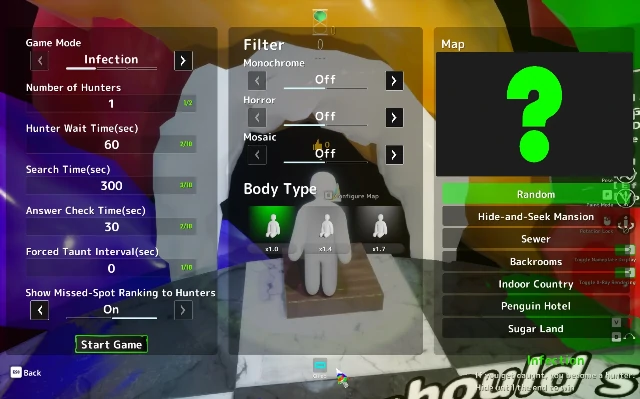
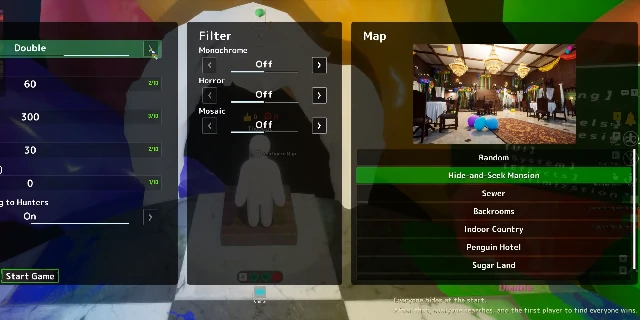
Once inside the server, walk over to the podium with the light blue button. Press E to configure the map. From there, the host can change the map, game mode, paint time, hunt time, Forced Taunt frequency, and more.
2. Server Settings Overview
The lobby configuration menu is where the host defines the rules of the round. The exact settings may change with updates, but the main options include:
Map Selection
Choose which map the round will take place on. Each map has a different theme, lighting style, and hiding potential. Some maps are bright and clean, while others are cluttered or shadow-heavy.
Game Mode
Choose between Basic, Infection, and Double. These are covered in detail in the next sections.
Paint Time
How long hiders have to paint themselves and find a hiding spot before hunters enter the map. Longer times help new players. Shorter times create more chaos and favor players who already know good spots.
Hunt Time
How long hunters have to find every hider. Longer hunt times give hunters more time to search, which rewards thorough players. Shorter times put pressure on hunters and favor hiders who can survive the initial rush.
Forced Taunt Frequency
Forced Taunt is a setting that makes every hider automatically whistle at set intervals. The host can choose how often it happens. More frequent taunts make hiding harder but give hunters more audio cues. Less frequent taunts make the game more relaxed.
Ammo Limit
Introduced in update 2.3.0, this lets the host restrict how many shots hunters can fire. The host can set the ammo count between 1 and 99, with a default of 5. Hunters restore ammo when they hit a hider. This setting prevents random spam shooting and encourages careful aiming.
Filters
Hosts can apply visual filters that change how the game looks for everyone. Filters are covered later in this guide.
3. The Three Game Modes
MECCHA CHAMELEON currently has three main modes. Each one changes the structure of the round and the pressure on both sides.
| Mode | Core Idea | Win Condition |
|---|---|---|
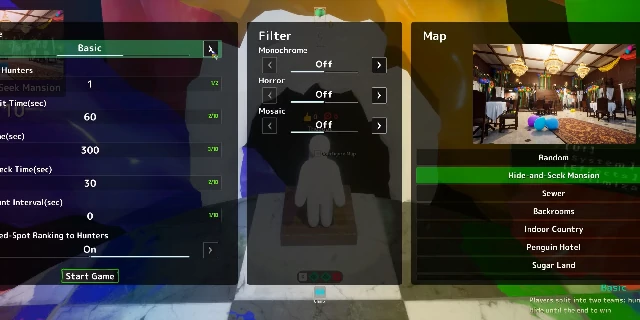
| Basic | Classic hide-and-seek | Hunters win by finding all hiders. Hiders win if at least one survives until time runs out. |
| Infection | Hide-and-seek with growing hunter team | Same as Basic, but caught hiders become hunters. The last hiders face mounting pressure. |
| Double | Everyone plays both roles | All players hide first, then all become hunters. The player who finds the most hiders wins. |
Only the host can choose the game mode. Make sure the mode fits the group before starting the round.
4. Basic Mode in Detail
Basic is the classic MECCHA CHAMELEON experience and the best place for new players to start.
How It Works
At the start of the round, players are split into two teams: hiders and hunters. Hiders get a short preparation phase to paint themselves and find a hiding spot. Hunters wait in the lobby until the hunt phase begins. Once the timer starts, hunters must find every hider before the round ends.
Win Conditions
- Hunters win: Find every hider before time runs out.
- Hiders win: At least one hider survives until the timer expires.
Why Play Basic
Basic mode is the purest version of the game. It teaches the core mechanics: painting, hiding, searching, and spotting. It works well for new players, casual groups, and anyone who wants the traditional hide-and-seek experience without extra twists.
Basic Mode Strategy Notes
- Hiders should focus on finding one strong spot and surviving.
- Hunters should work together to cover different areas of the map.
- Communication matters, especially when hunters are trying to clear large maps.
5. Infection Mode in Detail
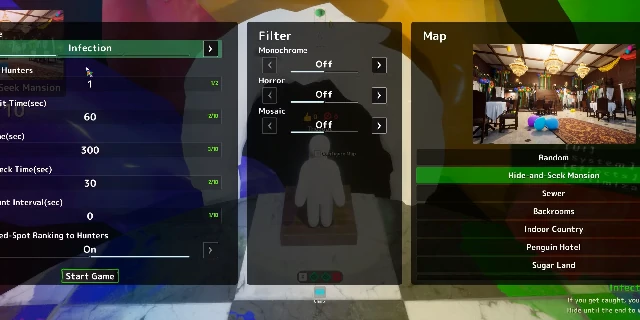
Infection starts like Basic but adds a snowball effect. The longer the round lasts, the harder it becomes for hiders to survive.
How It Works
When a hunter catches a hider, that player does not get eliminated. Instead, they immediately join the hunter team. Over time, the number of hunters grows while the number of hiders shrinks. The final hiders must survive against a much larger seeking force.
Win Conditions
- Hunters win: Every hider is caught and converted.
- Hiders win: At least one hider survives until the end of the round.
Why Play Infection
Infection is the most frantic mode. It rewards hiders who know strong spots because they will need to survive longer than in Basic. It also gives eliminated players something to do instead of waiting, since they join the hunters and keep playing.
Infection Mode Strategy Notes
- Early hunters should focus on catching as many hiders as possible to build the team.
- Hiders should pick spots that are hard to reach or check from multiple angles.
- The last few hiders need patience and a willingness to relocate if the area is being overrun.
6. Double Mode in Detail
Double changes the formula by making every player experience both roles in the same round.
How It Works
At the start, every player hides and paints themselves. After the preparation phase ends, every player becomes a hunter. The goal is to find the other players' hiding spots. Since everyone has their own hidden spot on the map, the winner is whoever finds the most players before the match ends.
Win Conditions
The player with the fastest and most efficient seeking performance wins after both halves of the round are complete.
Why Play Double
Double is the most competitive mode. Everyone is playing both sides, so players need to be good at hiding and good at seeking. It also removes the team dynamic because every player is ultimately competing against everyone else.
Double Mode Strategy Notes
- Pick a hiding spot that is strong but also memorable, so you can return to it later when hunting.
- While hunting, remember where other players might have gone based on the map layout.
- Advanced techniques like clones and object mimicry are common in this mode.
7. Which Mode Should You Choose?
The right mode depends on your group, your mood, and what you want to practice.
Mode Comparison
| Factor | Basic | Infection | Double |
|---|---|---|---|
| Best for | Learning the game | Fast-paced chaos | Competitive groups |
| Team structure | Fixed teams | Shifting teams | Every player for themselves |
| Pressure on hiders | Moderate | High, increasing over time | Moderate but personal |
| Eliminated players | Wait for the next round | Join the hunters | Keep playing as hunters |
| Skill focus | Core hide-and-seek | Survival under pressure | Both hiding and seeking |
Recommendations
- New players: Start with Basic. It is the clearest expression of the game loop.
- Large groups: Infection scales well because eliminated players stay involved.
- Competitive players: Double is the best test of overall skill.
- Casual fun: Any mode works, but Basic or Infection are the easiest to explain.
- Streamer content: Infection and Double tend to create more dramatic moments.
8. Ammo Limit Setting
The Ammo Limit setting was added in update 2.3.0. It gives hosts a way to make hunters more careful about their shots.
How to Enable It
Only the host can change this setting. In the lobby, approach the blue podium and press E to configure the map. Look at the left column of settings, opposite the map selection. Near the bottom, you will find the Ammo Limit option. Use the arrows to turn it on or off.
Setting the Ammo Count
If Ammo Limit is enabled, the host can choose how much ammo hunters start with. The value can be any number between 1 and 99. The default is 5. Because the input only accepts two digits, you cannot set more than 99.
How Ammo Works During a Round
When a hunter hits a hider, their ammo is restored. This means a hunter who only shoots at real hiders can theoretically keep playing with the same ammo count. However, if a hunter misses or shoots at a clone, the ammo is consumed. This discourages blind spam firing.
Why Use Ammo Limit
The setting is designed to nerf hunters who rely on spraying shots randomly. With limited ammo, hunters must aim carefully and think before firing. This makes the game more challenging for hunters and more fair for hiders.
When to Use It
- When hunters are much more experienced than hiders.
- When you want to encourage careful searching.
- When the lobby is small and random spraying would be too powerful.
9. Hunter Third-Person Camera
Update 2.0.0, released on June 26, added the ability for hunters to switch between first-person and third-person camera views.
How to Switch Camera Modes
As a hunter, press Right-Click on the mouse to toggle between first-person shooter (FPS) and third-person shooter (TPS) perspectives. This only works for hunters. Hiders do not have FPS or TPS camera options.
What Third-Person Adds
In third-person mode, hunters can see their own character model. This is mostly a cosmetic benefit, since hunters can press F in the lobby to paint themselves and create custom skins. The third-person view lets them show off their designs during the hunt.
Does It Help With Hunting?
The third-person camera does not give hunters a gameplay advantage in spotting hiders. It is purely for fun and visual expression. Some players still prefer it for wider peripheral vision, but it is not a competitive requirement.
Hider Free Camera
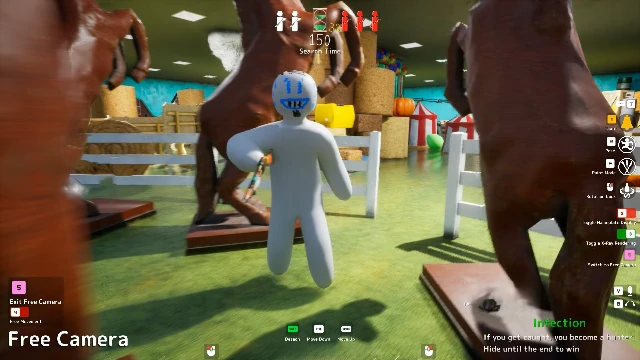
Hiders do not have FPS or TPS options, but they can use Free Camera. After hiding, press 5 to enter free camera mode. Press 4 to free roam instead of following a hunter. This helps hiders check their own paint job from different angles and watch the round unfold.
10. The Eeyan System
Eeyans are a social feature in MECCHA CHAMELEON. The word "Eeyan" is a Japanese term meaning "That's great." They work like likes or commendations for good hiding spots.
When Eeyans Appear
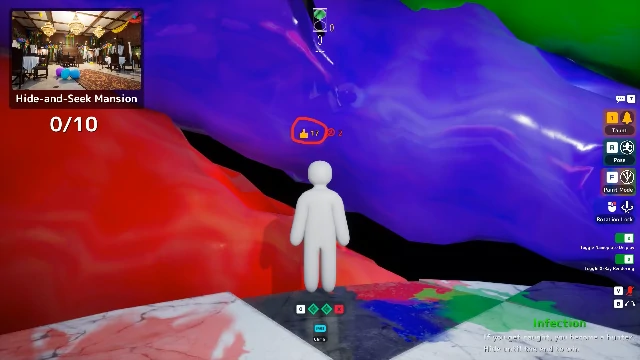
After the round ends, the game enters the Answer Check phase. During this phase, players can walk around the map and see where everyone hid. The most recent hiding spot of each player flashes through walls so others can find them.
How to Give an Eeyan
Walk up to a player's hiding spot and press G to give them an Eeyan. You can give one Eeyan per match, so choose the spot you liked most. Good reasons to give an Eeyan include:
- A clever or hard-to-find hiding spot.
- An impressive paint job.
- A funny or creative idea.
How Eeyans Are Displayed
Eeyans appear above player names next to a thumbs-up icon. The number is permanent and follows the player across lobbies and groups. It is a visible sign of reputation for creative hiding.
How to Get More Eeyans
You can only receive one Eeyan per match, and it must be on your most recent hiding spot. Clones are not eligible for Eeyans. The best way to earn Eeyans is to create memorable, creative, or technically impressive spots that other players want to praise.
Eeyans and Gameplay
Eeyans do not affect the outcome of the round. They are purely a social reward. Think of them as applause for a good performance rather than a score mechanic.
11. Filters and Visual Effects
Hosts can apply visual filters that change how the entire match looks. These filters are mostly for fun, but they also change how easy or hard it is to spot hiders.
Available Filters
| Filter | Effect | Gameplay Impact |
|---|---|---|
| Monochrome | Black and white | Color-based camouflage becomes harder to judge. Shape and silhouette become more important. |
| Horror | Stronger highlights and shadows | Shadows are more dramatic. Dark spots become stronger for hiders, but outlines may also pop more. |
| Mosaic | Pixelated view | Details blur together. Long-range spotting is harder, but blocky anomalies can stand out up close. |
Mixing Filters
Hosts can combine filters. For example, Monochrome plus Horror removes color and exaggerates shadows. Mosaic plus Horror creates a distorted, high-contrast look. Mixed filters make the match feel very different from standard gameplay.
When Filters Change the Game
- Monochrome: Rewards hiders who break their silhouette and hunters who focus on shape.
- Horror: Helps hiders who use shadows, but can expose outlines under direct light.
- Mosaic: Favors cluttered spots where details blend, but hurts clean color-block hiding.
If you are hosting a serious match, you may want to leave filters off. If you are hosting a fun or themed session, filters add variety.
12. Recommended Lobby Setups
Different groups want different experiences. Here are recommended configurations for common situations.
Casual Fun with Friends
- Mode: Basic or Infection
- Paint time: Longer
- Hunt time: Medium
- Forced Taunt: Off or infrequent
- Ammo limit: Off
- Filters: Off or one fun filter
This setup keeps things relaxed and gives everyone time to enjoy the paint and hide mechanics.
Competitive Practice
- Mode: Double
- Paint time: Short
- Hunt time: Short to medium
- Forced Taunt: On, frequent
- Ammo limit: On, low ammo
- Filters: Off
This setup forces players to play both sides efficiently and punishes sloppy hiding and shooting.
New Player Teaching
- Mode: Basic
- Paint time: Long
- Hunt time: Long
- Forced Taunt: Off
- Ammo limit: Off
- Filters: Off
Give new players plenty of time to learn painting, hiding, and searching without pressure.
Chaos and Meme Sessions
- Mode: Infection or Double
- Paint time: Short
- Hunt time: Short
- Forced Taunt: On, frequent
- Ammo limit: On, low ammo
- Filters: Multiple mixed filters
This setup creates maximum chaos and memorable moments for streamers or party groups.
Small Group Sessions
- Mode: Basic
- Paint time: Medium
- Hunt time: Medium
- Forced Taunt: On, medium frequency
- Ammo limit: On, default 5
- Filters: Off
With fewer players, hunters need a few audio cues to find people. Ammo limit prevents spam shooting in small lobbies.
13. FAQ
How many players can join a server?
The maximum is 24, but the developers recommend staying at 14 or fewer for stability.
Can I play cross-platform?
No. As of the current version, MECCHA CHAMELEON is only available on PC.
How do I join a friend's private server?
Click Find Server, then Find Private Server, enter the server name and password, and click Join.
Who can change the game mode and settings?
Only the host can change settings through the blue podium in the lobby.
What is the difference between Basic and Infection?
In Basic, players stay on fixed teams. In Infection, caught hiders become hunters, so the hunter team grows over time.
What is Double mode?
Everyone hides first, then everyone becomes a hunter. The player who finds the most hiders wins.
Does third-person camera help hunters find hiders?
No. It is purely cosmetic and lets hunters see their own character model.
What does Ammo Limit do?
It limits how many shots hunters can fire. Ammo is restored when a hunter hits a hider, so careful aim is rewarded.
What are Eeyans?
Eeyans are social likes given during the Answer Check phase at the end of a round. Press G to commend a hiding spot you liked.
Do filters affect gameplay?
Yes. Filters change how the game looks, which can make certain hiding strategies stronger or weaker.
What is the best mode for new players?
Basic mode is the clearest and most forgiving introduction to the game.
Where to go next